
Introduction
Table of Contents
What Is SEO? Have you ever searched something on Google like “how to start a blog,” “best laptop under ₹50,000,” or “how to earn money online”?
Within seconds, Google shows thousands of results. Most people click one of the first few websites and rarely visit the second page.
But have you ever wondered why some websites appear at the top while others remain hidden?
A few years ago, I believed that writing a good article was enough to get visitors. I spent hours researching, writing, and publishing blog posts. However, after publishing, almost nobody visited my website. Sometimes I received only a few visitors in an entire week.
That experience taught me an important lesson.
Great content alone is not enough. People need to find it first.
This is exactly where SEO becomes important.
SEO helps search engines understand your content and show it to people who are searching for information like yours. It is not about cheating Google or using secret tricks. Instead, it is about creating helpful content, improving your website, and giving users the best possible experience.
Think about a beautiful shop built inside a forest where nobody knows it exists. No matter how good the products are, customers will never visit.
Now imagine placing the same shop on a busy road with a clear signboard. Suddenly, people start finding it easily.
Your website works in the same way.
SEO is like putting your website on that busy road where people can discover it through Google.
In this beginner-friendly guide, you will learn:
- What SEO really means
- How search engines work
- Why SEO matters
- Different types of SEO
- How beginners can start learning SEO
- Common mistakes to avoid
- Free tools that make SEO easier
Whether you are a blogger, student, freelancer, business owner, or someone planning to create a website, this guide will help you understand SEO in simple English with practical examples.
Let’s begin with the most basic question.
What exactly is SEO?
What Is SEO?
SEO stands for Search Engine Optimization.
It is the process of improving your website so that search engines like Google, Bing, and Yahoo can understand your content and show it to the right people when they search online.
In simple words,
SEO helps your website appear in Google search results without paying for ads.
For example, imagine you own a blog about gardening.
You publish an article called:
“How to Grow Tomatoes at Home.”
If someone searches for:
- How to grow tomatoes
- Tomato gardening tips
- Best soil for tomatoes
Google decides which websites deserve to appear first.
If your article is useful, well-written, fast-loading, and properly optimized, Google is more likely to show your article near the top of the results.
That is SEO.
It is not magic.
It is not luck.
It is the result of following good practices consistently.
A Simple Real-Life Example
Imagine you visit a huge library with millions of books.
Without labels, categories, or an index, finding one book would take hours.
Now imagine every book is properly organized by topic, title, author, and category.
Finding the right book becomes easy.
Google works in a similar way.
SEO helps organize your website so Google understands:
- What your page is about
- Who should see it
- When it should appear in search results
The better Google understands your content, the better your chances of ranking higher.
Why Is SEO Important?
Imagine you opened a beautiful clothing store in your city. You spent money on decoration, arranged the products perfectly, and hired good staff. But there is one problem—the shop is located on a road where almost nobody passes.
No matter how good your products are, people won’t buy them because they don’t even know your shop exists.
The same thing happens with websites.
You can write an amazing blog post or create a useful website, but if people cannot find it on Google, your hard work may go unnoticed.
This is why SEO is important.
SEO helps your website become visible when people search for topics related to your content. Instead of waiting for visitors, SEO helps bring the right audience to your website.
Let’s understand this with a simple example.
Suppose you write an article called “Best Free SEO Tools for Beginners.”
Every month, thousands of people search Google using phrases like:
- Best free SEO tools
- SEO tools for beginners
- Free keyword research tools
If your article is well-written, answers the reader’s questions, loads quickly, and follows good SEO practices, Google has a better chance of showing it in the search results.
When more people find your article, you get more visitors without paying for advertisements.
That is the real power of SEO.
SEO Brings the Right Audience
One of the biggest advantages of SEO is that it attracts people who are already looking for your content.
For example, if someone searches “How to start a blog in India,” they are already interested in blogging. If your article appears in the search results, there is a much higher chance that they will click and read it.
This means SEO doesn’t just bring traffic—it brings relevant traffic.
Visitors who are interested in your topic are more likely to stay longer, read more articles, subscribe to your newsletter, or even buy your products or services in the future.
SEO Builds Trust
Think about your own search habits.
When you search on Google, do you usually click on the first few results or the tenth page?
Most people trust websites that appear near the top because they believe Google has shown the most useful results first.
While ranking on the first page doesn’t automatically mean a website is the best, it often creates a strong first impression.
That’s why good SEO can also help build credibility and trust.
SEO Supports Long-Term Growth
Paid advertisements can bring visitors quickly, but once you stop paying, the traffic usually drops.
SEO works differently.
A helpful article can continue bringing visitors for months or even years if it stays updated and useful.
For example, a beginner’s guide to SEO written today can still help readers next year with small updates.
That makes SEO one of the most valuable long-term investments for a blog or website.
Key Benefits of SEO
- Increases organic traffic
- Helps the right audience find your website
- Builds trust and credibility
- Improves user experience
- Supports long-term website growth
- Reduces dependence on paid advertising
- Creates more opportunities for leads, subscribers, and sales
In simple words, SEO is not just about ranking higher on Google. It is about helping the right people find the right information at the right time.
A Simple SEO Resource for Small Business Owners (E-BOOK)
Learning SEO can feel overwhelming when you are just getting started. There are many technical terms, strategies, and recommendations to understand, and it can be difficult to know what to focus on first.
If you run a small business and want a more structured way to learn the fundamentals, Simple SEO for Small Businesses is one resource you may want to explore. The ebook focuses on beginner-friendly SEO concepts, including keyword selection, on-page optimization, content, backlinks, local SEO, and ways to track your progress.
What makes it potentially useful for beginners is its focus on practical steps rather than highly technical SEO terminology. It may be especially helpful for small business owners who want to understand SEO themselves instead of depending entirely on an agency.
What you can learn from the ebook:
- Basic SEO concepts and why they matter for small businesses
- How to identify keywords that are relevant to your audience
- Simple on-page SEO practices
- The role of useful content and backlinks
- Local SEO fundamentals
- Basic ways to monitor and improve SEO performance
It is an educational resource, so it should not be viewed as a guarantee of rankings or traffic. SEO results can vary depending on your website, competition, industry, content quality, and consistency.
👉 Explore Simple SEO for Small Businesses
How Search Engines Work?
Have you ever wondered what happens after you publish a new article on your website?
You click the Publish button and expect your article to appear on Google immediately. But that doesn’t happen. Before your page can appear in search results, Google follows a step-by-step process.
Understanding this process is important because it helps you know why some pages rank quickly while others take time.
Let’s understand it in the simplest way possible.
Imagine Google as a Huge Library
Think of Google as the world’s largest digital library.
Instead of books, this library stores billions of web pages. Every day, thousands of new pages are added, while many existing pages are updated.
Now imagine there is a smart librarian whose job is to visit every new book, understand what it is about, place it on the correct shelf, and recommend it whenever someone asks a related question.
Google works in almost the same way.
The only difference is that Google doesn’t use human librarians. It uses special computer programs called Googlebots or Search Crawlers.
These bots travel across the internet day and night, looking for new and updated web pages.
Step 1 – Crawling
The first step is called Crawling.
Crawling simply means discovering new pages.
Googlebot visits websites and follows links from one page to another. When it finds a new article, it reads the page and collects basic information.
For example, imagine you publish a new article on your blog titled “Best Free SEO Tools for Beginners.”
Google doesn’t know about this article automatically.
It has to find it first.
Googlebot can discover your page in several ways:
- Through your XML Sitemap
- Through internal links from another article
- Through backlinks from other websites
- By revisiting your website regularly
This is one reason why submitting your sitemap to Google Search Console is so important. It helps Google discover your content faster.
Step 2 – Indexing
After Google finds your page, it tries to understand it.
This process is called Indexing.
Google reads your page and checks things like:
- Your page title
- Headings
- Main content
- Images and Alt Text
- Internal links
- Overall quality of the page
If everything looks useful and accessible, Google stores your page in its search database.
Think of it like adding a new book to a library catalogue. Once the book is listed, people can easily find it.
However, not every page gets indexed. Pages with very little content, duplicate information, or technical problems may be skipped.
Step 3 – Ranking
Once your page is indexed, Google decides where it should appear in search results.
This step is called Ranking.
Suppose someone searches for “What is SEO?”
Google may find thousands of pages related to SEO. It then compares those pages and tries to show the most useful ones first.
To make this decision, Google looks at many factors, including:
- Content quality
- Relevance to the search query
- Page speed
- Mobile-friendly design
- User experience
- Website authority
- Fresh and updated information
The better your content helps users, the better your chances of ranking higher.
A Simple Real-Life Example
Imagine two students preparing for the same exam.
The first student studies every chapter carefully, practices regularly, and understands the concepts.
The second student studies only one day before the exam.
Who is more likely to get better marks?
Most people would choose the first student.
Google works in a similar way.
Websites that consistently publish helpful, original, and well-organized content usually perform better than websites with low-quality or copied content.
Every page on Google goes through three important stages:
Crawling → Indexing → Ranking
If Google cannot discover your page, it cannot index it.
If it cannot index your page, it cannot rank it.
That’s why good SEO is not just about writing content. It is also about helping Google find, understand, and trust your website.
Types of SEO
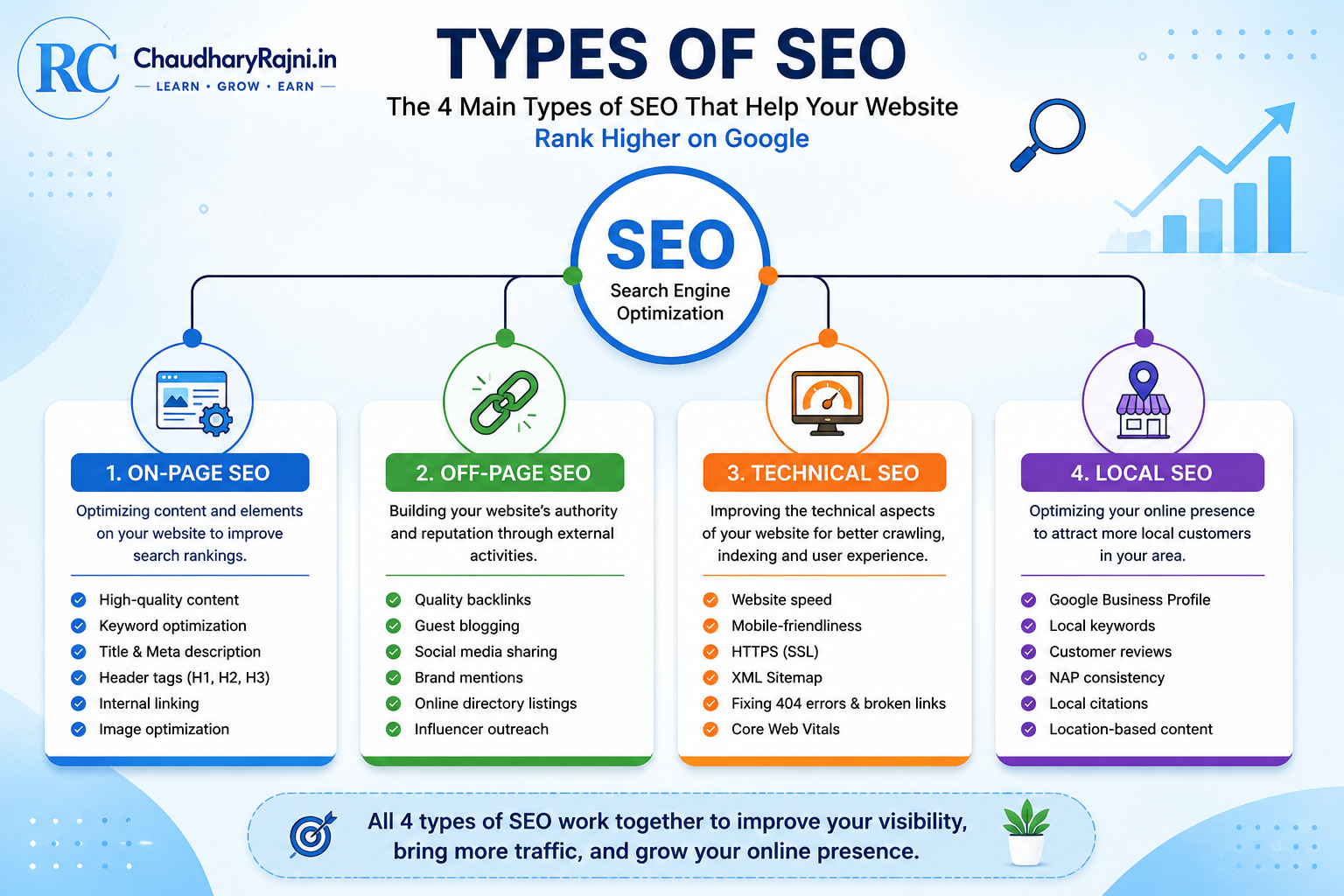
Now that you understand what SEO is and how search engines work, the next step is to learn the different types of SEO.
Many beginners think SEO is just about using keywords. In reality, SEO is much bigger than that.
To improve your website’s visibility on Google, you need to work on different areas of SEO. Each type has its own purpose, and together they help your website perform better in search results.
Let’s understand the four main types of SEO in simple words.
1. On-Page SEO
On-Page SEO includes everything you do inside your website to help search engines and users understand your content better.
It focuses on creating useful, well-structured, and user-friendly pages.
Some important On-Page SEO practices include:
- Writing high-quality and original content
- Using the main keyword naturally
- Creating clear headings (H1, H2, H3)
- Writing an attractive SEO title and meta description
- Optimizing images with Alt Text
- Adding internal links to related articles
- Improving readability with short paragraphs and bullet points
Real-Life Example
Imagine you are decorating your home before inviting guests.
You clean the rooms, arrange the furniture, and make everything look organized.
On-Page SEO works in the same way. It helps make your web pages clean, useful, and easy to understand for both visitors and search engines.
2. Off-Page SEO
Off-Page SEO refers to activities that happen outside your website but help improve its reputation and authority.
The most important part of Off-Page SEO is getting quality backlinks from trusted websites.
When a reputable website links to your content, Google sees it as a positive signal.
Other Off-Page SEO activities include:
- Guest blogging
- Social media sharing
- Brand mentions
- Online directory listings
- Building relationships with other websites
Real-Life Example
Think about choosing a doctor.
If many people recommend the same doctor, you naturally trust them more.
Similarly, when trusted websites recommend your content through backlinks, Google gains more confidence in your website.
3. Technical SEO
Technical SEO focuses on improving the technical performance of your website so that search engines can crawl and index your pages without problems.
Some common Technical SEO tasks include:
- Improving website speed
- Making the site mobile-friendly
- Using HTTPS (SSL)
- Creating an XML Sitemap
- Fixing broken links and 404 errors
- Improving Core Web Vitals
Real-Life Example
Imagine a beautiful shopping mall with broken lifts, poor lighting, and confusing directions.
Even though the shops are good, visitors may have a bad experience.
Technical SEO ensures your website runs smoothly so both users and search engines can navigate it easily.
4. Local SEO
Local SEO helps businesses appear in search results for a specific city or location.
It is especially useful for restaurants, clinics, shops, salons, hotels, and other local businesses.
For example, when someone searches:
- Best dentist near me
- Coffee shop in Delhi
- Grocery store in Panipat
Google shows nearby businesses based on their location.
Some important Local SEO factors include:
- Google Business Profile
- Accurate business information
- Customer reviews
- Local keywords
- Location-based content
If you run a local business, Local SEO can help attract customers from your area.
Each type of SEO has a different purpose:
- On-Page SEO improves your content.
- Off-Page SEO builds your website’s authority.
- Technical SEO improves your site’s performance.
- Local SEO helps you reach nearby customers.
The best SEO strategy is to combine all four types instead of focusing on just one.
How to Do SEO Step by Step
Now that you understand what SEO is and the different types of SEO, the next question is obvious:
How do you actually do SEO?
Many beginners think SEO is difficult because there are so many tools, techniques, and technical terms. The good news is that you don’t need to learn everything at once.
If you follow a simple step-by-step process, you can build a strong SEO foundation and gradually improve your website’s visibility on Google.
Let’s go through each step.
Step 1: Start with Keyword Research
Every successful SEO strategy begins with keyword research.
A keyword is the word or phrase that people type into Google when they are looking for information.
For example:
- What is SEO
- Best SEO tools
- How to start a blog
- Earn money online
Your goal is to understand what your audience is searching for and create content that answers their questions.
You can use tools like Google Keyword Planner, Google Autocomplete, Google Trends, or free SEO tools to discover popular search terms.
Real-Life Example
Imagine you own a bookshop. Before buying new books, you first find out which books customers are asking for.
Keyword research works in the same way. Instead of guessing, you create content based on what people actually want to read.
Step 2: Create Helpful and Original Content
Once you know your target keyword, the next step is to create valuable content.
Don’t write articles just to rank on Google. Write them to solve a real problem.
Ask yourself:
- Does this article answer the reader’s question?
- Is the information accurate and easy to understand?
- Does it provide practical value?
Google rewards content that is helpful, trustworthy, and written for people rather than search engines.
Instead of copying information from other websites, share your own explanations, examples, and experiences whenever possible.
Quick Tip
A shorter article that genuinely helps readers is often more valuable than a long article filled with unnecessary information.
Step 3: Optimize Your SEO Title and Meta Description
Your SEO title is the first thing many people notice in Google Search.
A good title should:
- Include your main keyword naturally.
- Clearly explain what the article is about.
- Encourage users to click.
The meta description should briefly summarize the page and make readers curious to learn more.
Think of the title and description as the cover of a book. If they are clear and interesting, more people are likely to open it.
Good SEO starts with understanding your audience.
Find the right keywords, create helpful content, and optimize your title and meta description. These three steps form the foundation of every successful SEO strategy.
Step 4: Use Proper Headings (H1, H2, and H3)
A well-written article is not only easy for readers to understand but also easier for search engines to read.
This is where headings play an important role.
Think of headings as a roadmap for your article. They divide your content into clear sections and help readers quickly find the information they are looking for.
Search engines also use headings to understand the structure and topic of your content.
Understanding Heading Tags
There are different heading levels, but the most important ones are:
- H1 – The main title of your page.
- H2 – Main sections of your article.
- H3 – Subtopics under an H2 section.
For example:
H1: What Is SEO? A Complete Beginner’s Guide
H2: What Is SEO?
H2: Why Is SEO Important?
H2: Types of SEO
H3: On-Page SEO
H3: Off-Page SEO
This structure makes your article organized and easier to follow.
Why Headings Matter
Good headings improve both user experience and SEO.
They help readers scan long articles without feeling overwhelmed.
They also help search engines understand the relationship between different sections of your content.
When your article has a logical structure, Google can better understand its topic and relevance.
Best Practices for Using Headings
Follow these simple rules:
- Use only one H1 on a page.
- Divide your article into clear H2 sections.
- Use H3 headings only when you need to explain a topic in more detail.
- Keep headings short, clear, and descriptive.
- Include your keyword naturally where it makes sense.
- Never use headings just to make text look bigger.
Real-Life Example
Imagine reading a book without chapter titles.
Every page would look the same, and finding a specific topic would take a lot of time.
Headings work like chapter titles. They guide readers through your content and make learning easier.
Common Mistakes to Avoid
Many beginners make these mistakes:
- Using multiple H1 headings.
- Skipping heading levels (for example, H2 directly to H4).
- Writing very long or confusing headings.
- Stuffing keywords unnaturally into every heading.
Avoiding these mistakes helps keep your article clean, readable, and SEO-friendly.
Headings are more than just large text.
They organize your content, improve readability, and help search engines understand your page.
A clear heading structure creates a better experience for both readers and Google.
Step 5: Optimize Images for SEO
Images make your article more attractive and easier to understand. A well-designed image can explain a concept faster than a long paragraph.
However, simply uploading images is not enough. If images are not optimized, they can slow down your website and affect your SEO performance.
Choose the Right File Name
Before uploading an image, rename it with a clear and descriptive file name.
For example:
❌ IMG12345.jpg
✅ what-is-seo-guide.jpg
A meaningful file name helps search engines understand what the image is about.
Add Alt Text
Alt Text (Alternative Text) describes your image.
It is useful because:
- Search engines understand your images better.
- Screen readers can describe images to visually impaired users.
- Images have a better chance of appearing in Google Image Search.
Write short, natural, and descriptive Alt Text instead of stuffing keywords.
Example:
Image: SEO workflow infographic
Good Alt Text:
SEO workflow showing keyword research, content creation, and website ranking.
Compress Images
Large image files increase page loading time.
Before uploading an image, compress it to reduce its file size while maintaining good quality.
Fast-loading pages provide a better user experience and support SEO.
Use the Right Image Format
Choose the format based on your needs:
- WebP – Best for most websites because it offers excellent quality with smaller file sizes.
- JPEG/JPG – Good for photographs.
- PNG – Best for logos, icons, and images with transparent backgrounds.
Use Relevant Images
Every image should support the content of your article.
Avoid adding random stock photos just to fill space.
Instead, use:
- Infographics
- Diagrams
- Charts
- Screenshots
- Step-by-step illustrations
These types of images help readers understand your topic more easily.
Real-Life Example
Imagine reading a recipe that contains only text.
Now imagine the same recipe with clear step-by-step pictures.
Which one would be easier to follow?
Most people would choose the second one.
The same principle applies to blog articles. Helpful images improve the reading experience and keep visitors engaged.
Optimized images improve both user experience and SEO.
Always use descriptive file names, write meaningful Alt Text, compress images before uploading, and choose images that genuinely help your readers understand the topic.
Step 6: Use Internal and External Links
Links are an important part of SEO because they help both readers and search engines discover useful information.
A well-linked article is easier to navigate and provides a better user experience.
There are two main types of links you should use in your content:
- Internal Links
- External Links
Let’s understand both.
Internal Links
Internal links connect one page of your website to another page on the same website.
For example, if you are reading an article about SEO and you have already written another article on Best Free SEO Tools for Beginners, you can add a link to that article.
Internal linking helps readers explore more content without leaving your website.
It also helps search engines understand the relationship between different pages and discover your content more efficiently.
Benefits of Internal Linking
- Helps visitors find related articles.
- Increases the time users spend on your website.
- Makes website navigation easier.
- Helps search engines crawl your pages.
- Passes SEO value between related pages.
External Links
External links point to trusted websites outside your own website.
For example, if you explain how Google Search works, you can refer readers to Google’s official documentation for more detailed information.
Using relevant and trustworthy external sources shows that your content is well-researched and reliable.
However, don’t add external links just for the sake of it. Every external link should genuinely help your readers.
Best Practices for Linking
Follow these simple tips:
- Link only to pages that are relevant to the topic.
- Use descriptive anchor text instead of generic phrases like “Click Here.”
- Don’t add too many links in a single paragraph.
- Make sure your links are working and not broken.
- Give priority to high-quality and trusted websites when adding external links.
Real-Life Example
Imagine you are reading a history book.
At the end of a chapter, the author suggests another chapter for deeper understanding and also recommends a trusted reference book for additional reading.
That is exactly how internal and external links work.
One keeps readers exploring your own website, while the other guides them to trusted sources when they need more information.
Common Mistakes to Avoid
Many beginners make these linking mistakes:
- Adding links that are not related to the topic.
- Using the same anchor text everywhere.
- Linking to low-quality or spammy websites.
- Ignoring broken links.
- Adding too many links, making the article difficult to read.
Avoiding these mistakes helps create a cleaner and more trustworthy website.
Internal links help readers and search engines explore your website, while external links add credibility by connecting your content with reliable sources.
A balanced linking strategy improves user experience, strengthens your website structure, and supports long-term SEO growth.
Step 7: Improve Your Website Speed
Website speed is one of the most important factors in SEO and user experience.
Think about your own browsing habits.
When you click on a website and it takes too long to load, what do you usually do?
Most people simply close the page and open another website.
Google understands this behavior. That’s why it prefers websites that load quickly and provide a smooth browsing experience.
A fast website keeps visitors engaged, reduces bounce rates, and increases the chances of people reading more pages.
Why Website Speed Matters
A slow website can affect your SEO in several ways.
- Visitors may leave before the page finishes loading.
- User experience becomes poor.
- Page views may decrease.
- Conversions and engagement can drop.
- Search engines may not rank slow websites as well as faster competitors.
Even if your content is excellent, a slow website can stop people from enjoying it.
Simple Ways to Improve Website Speed
You don’t need to be a developer to make your website faster.
Here are a few beginner-friendly tips:
- Compress images before uploading them.
- Use modern image formats like WebP whenever possible.
- Choose a fast and reliable web hosting provider.
- Remove plugins that you no longer use.
- Keep WordPress, themes, and plugins updated.
- Enable browser caching if your hosting supports it.
- Use lightweight themes that load quickly.
Making these small improvements can have a big impact on your website’s performance.
Real-Life Example
Imagine visiting two grocery stores.
The first store is clean, well-organized, and you find everything within a few minutes.
The second store is crowded, messy, and you spend a long time looking for simple items.
Which store would you visit again?
Most people would choose the first one.
A fast website creates the same positive experience for your visitors.
How to Check Your Website Speed
You don’t have to guess whether your website is fast or slow.
Free tools can analyze your website and suggest improvements.
Some popular tools include:
- Google PageSpeed Insights
- GTmetrix
- Pingdom Website Speed Test
These tools provide useful reports that help you identify performance issues and improve your website over time.
Common Mistakes to Avoid
Many beginners accidentally slow down their websites by:
- Uploading large image files.
- Installing too many plugins.
- Using heavy themes with unnecessary features.
- Ignoring regular updates.
- Adding too many animations or large videos on a single page.
Avoiding these mistakes will help your website stay fast and user-friendly.
A fast website creates a better experience for visitors and supports your SEO efforts.
By optimizing images, keeping your website lightweight, and using reliable hosting, you can improve both user satisfaction and your chances of performing well in search results.
🟦 Step 8: Make Your Website Mobile-Friendly
Today, most people browse the internet using their smartphones.
Whether someone wants to read a blog, shop online, or search for information, they usually reach for their mobile phone first.
Because of this change in user behavior, Google gives great importance to mobile-friendly websites.
If your website is difficult to use on a phone, visitors may leave quickly, and your search rankings can also be affected.
What Is a Mobile-Friendly Website?
A mobile-friendly website automatically adjusts to different screen sizes, making it easy to read and navigate on smartphones and tablets.
Visitors should not have to zoom in, scroll sideways, or struggle to click buttons.
Everything should be clear, fast, and easy to use.
Why Mobile-Friendliness Is Important
A mobile-friendly website offers several benefits:
- Provides a better user experience.
- Reduces bounce rates.
- Makes navigation easier.
- Helps visitors stay longer on your website.
- Supports better performance in Google Search.
When people enjoy using your website on their phones, they are more likely to explore other pages and return in the future.
How to Make Your Website Mobile-Friendly
You don’t need advanced technical knowledge to create a mobile-friendly website.
Here are some simple tips:
- Use a responsive WordPress theme.
- Choose readable font sizes.
- Keep paragraphs short.
- Use images that resize automatically.
- Make buttons large enough to tap easily.
- Avoid pop-ups that cover the entire screen.
- Test your pages on different mobile devices.
Small improvements like these can make a big difference in the overall user experience.
Real-Life Example
Imagine reading a newspaper.
If the text is too small and the pages are difficult to turn, you will probably stop reading.
Now imagine a magazine with clear text, attractive images, and an easy layout.
Which one would you prefer?
Most people would choose the second one.
A mobile-friendly website creates the same comfortable experience for online readers.
Common Mistakes to Avoid
Many beginners accidentally create poor mobile experiences by:
- Using very small text.
- Adding oversized images.
- Placing buttons too close together.
- Using themes that are not responsive.
- Ignoring how the website looks on different screen sizes.
Checking your website on a mobile phone before publishing new content is a simple habit that can prevent many of these issues.
A mobile-friendly website is no longer optional—it’s an essential part of modern SEO.
When your website works smoothly on smartphones and tablets, visitors have a better experience, and search engines can better recognize your website as user-friendly.
Step 9: Submit Your Website to Google Search Console
Creating a great website is only the first step. To help Google discover and understand your content faster, you should connect your website to Google Search Console.
Google Search Console is a free tool provided by Google that helps website owners monitor and improve their presence in Google Search.
It shows valuable information such as:
- Which pages are indexed by Google.
- What keywords bring visitors to your website.
- Website performance in search results.
- Mobile usability issues.
- Technical errors that may affect SEO.
By checking this data regularly, you can identify problems early and improve your website’s performance over time.
Why Is Google Search Console Important?
Many beginners think that publishing an article is enough for it to appear on Google.
In reality, Google first needs to discover and process your content.
Submitting your sitemap through Google Search Console makes it easier for Google to find your pages and understand your website structure.
While it doesn’t guarantee higher rankings, it helps Google discover your content more efficiently.
How to Set Up Google Search Console
Getting started is simple.
- Sign in with your Google account.
- Add your website as a property.
- Verify website ownership.
- Submit your XML Sitemap.
- Monitor indexing and performance reports regularly.
Once your website is verified, Google starts collecting useful data about your site’s search performance.
Real-Life Example
Imagine opening a new shop in a large city.
If you never register your business or tell anyone where it is located, customers may take longer to find it.
Google Search Console works in a similar way.
It helps Google discover your website faster and keeps you informed about how your website is performing in search results.
Common Mistakes to Avoid
Many beginners make these mistakes:
- Forgetting to submit the XML Sitemap.
- Ignoring indexing errors.
- Never checking performance reports.
- Removing pages without proper redirects.
- Ignoring warnings related to mobile usability or Core Web Vitals.
Reviewing Search Console regularly can help you solve these issues before they affect your website.
Google Search Console is one of the most valuable free SEO tools available.
It helps you monitor your website, discover technical issues, track keyword performance, and ensure that Google can properly crawl and index your content.
Step 10: Update Your Content Regularly
Publishing an article is not the end of your SEO journey. In fact, it is just the beginning.
Many beginners think that once an article is published, there is nothing more to do. However, successful websites regularly update their content to keep it fresh, accurate, and useful.
Search engines prefer content that stays relevant over time. If new information becomes available or something changes, updating your article helps maintain its quality and usefulness.
Why Regular Updates Matter
Updating your content offers several benefits:
- Keeps information accurate and up to date.
- Improves user trust.
- Helps maintain or improve search rankings.
- Increases the chances of attracting new visitors.
- Gives you an opportunity to add new examples, statistics, or tips.
A well-maintained article can continue bringing organic traffic for months or even years.
What Should You Update?
When reviewing an old article, check the following:
- Is all the information still correct?
- Are there any broken links?
- Can you add better examples or screenshots?
- Are there new SEO trends worth mentioning?
- Can you improve readability or add new FAQs?
Even small improvements can make your content more valuable.
How Often Should You Update Your Content?
There is no fixed rule, but reviewing important articles every 3 to 6 months is a good practice.
If your topic changes quickly, such as SEO, AI, or technology, you may need to update it more frequently.
For evergreen topics, a few updates each year are usually enough.
Real-Life Example
Think of your website like a garden.
If you water the plants, remove weeds, and take care of it regularly, the garden stays healthy and beautiful.
If you ignore it for months, it slowly loses its freshness.
Your blog works the same way. Regular updates help it grow stronger over time.
Common Mistakes to Avoid
Many website owners make these mistakes:
- Publishing articles and never updating them.
- Ignoring outdated information.
- Leaving broken links unfixed.
- Adding new content without checking older articles.
- Forgetting to refresh screenshots or examples.
Avoiding these mistakes helps your website remain useful for readers and trustworthy for search engines.
SEO is not a one-time task.
It is an ongoing process of creating, improving, and updating content.
When you regularly review your articles and keep them accurate, your website has a better chance of maintaining long-term visibility and providing lasting value to your readers.
Common SEO Mistakes Beginners Should Avoid
Learning SEO is important, but avoiding common mistakes is equally important.
Many beginners work hard on their websites but still don’t see good results because they unknowingly make small SEO mistakes.
The good news is that most of these mistakes are easy to fix once you understand them.
Let’s look at some of the most common SEO mistakes and how you can avoid them.
1. Ignoring Keyword Research
Some beginners start writing articles without understanding what people are actually searching for.
As a result, they create content that receives very little traffic.
Always spend a few minutes researching keywords before writing a new article.
2. Publishing Thin Content
Writing very short articles that provide little value is one of the biggest SEO mistakes.
Instead of focusing only on word count, create content that answers readers’ questions completely.
Helpful content always performs better than content written just to fill a page.
3. Keyword Stuffing
Using the same keyword repeatedly in every paragraph makes your content difficult to read.
Google prefers natural writing.
Use your main keyword where it fits naturally, and include related terms instead of repeating the exact phrase again and again.
4. Ignoring Title Tags and Meta Descriptions
A good article also needs an attractive SEO title and meta description.
If these are missing or poorly written, fewer people may click on your page in search results.
Write clear, descriptive, and engaging titles that match the content.
5. Not Optimizing Images
Uploading large images without compression or Alt Text can slow down your website and reduce your chances of appearing in Google Images.
Always use descriptive file names, compress images, and write meaningful Alt Text.
6. Forgetting Internal Links
Many website owners publish new articles but never connect them with older content.
Internal links help readers discover more pages and make it easier for search engines to crawl your website.
Aim to add relevant internal links whenever possible.
7. Ignoring Mobile Users
Most people browse websites on their phones.
If your website is difficult to use on mobile devices, visitors may leave quickly.
Always check your articles on a smartphone before publishing.
8. Never Updating Old Articles
SEO is not a one-time task.
If your content becomes outdated, it may gradually lose its value.
Review important articles regularly and update them with fresh information, better examples, and improved screenshots whenever needed.
9. Expecting Instant Results
Many beginners expect their website to rank on the first page within a few days.
SEO takes time.
Consistently publishing high-quality content and improving your website will usually produce better long-term results than looking for shortcuts.
10. Ignoring User Experience
SEO is not just about search engines.
If visitors cannot easily read your content or find the information they need, they are unlikely to stay on your website.
Focus on creating a clean layout, easy navigation, fast loading pages, and helpful content.
The biggest SEO mistakes are usually not technical—they are simple habits that can be improved.
By avoiding these common mistakes and focusing on creating valuable, user-friendly content, you build a stronger foundation for long-term SEO success.
Best Free SEO Tools for Beginners
SEO becomes much easier when you use the right tools.
The good news is that you don’t have to spend money to get started. Many powerful SEO tools are available for free and can help you improve your website, understand your audience, and track your progress.
Let’s explore some of the best free SEO tools every beginner should know.
1. Google Search Console
The link is here Google Search Console (https://search.google.com/search-console/)
Google Search Console is one of the most important free SEO tools.
It helps you monitor your website’s performance in Google Search.
With this tool, you can:
- Check which pages are indexed.
- Submit your XML Sitemap.
- Monitor search performance.
- Find indexing errors.
- Discover the keywords that bring visitors to your website.
If you own a website, this should be one of the first tools you set up.
2. Google Analytics
Google Analytics (https://analytics.google.com/)
Google Analytics helps you understand your website visitors.
It provides useful information such as:
- Number of visitors.
- Traffic sources.
- Popular pages.
- User behavior.
- Average time spent on your website.
These insights help you make better content decisions.
3. Google Keyword Planner
Google Keyword Planner (https://ads.google.com/home/tools/keyword-planner/)
Finding the right keywords is an essential part of SEO.
Google Keyword Planner helps you discover:
- New keyword ideas.
- Monthly search volume.
- Keyword trends.
- Competition levels.
It is especially useful when planning new blog topics.
4. Google Trends
Google Trends (https://trends.google.com/)
Google Trends shows what people are searching for over time.
You can compare keywords, identify seasonal trends, and discover topics that are becoming popular.
It is an excellent tool for finding fresh content ideas.
5. Google PageSpeed Insights
Google PageSpeed Insights (https://pagespeed.web.dev/
Website speed plays an important role in SEO.
Google PageSpeed Insights analyzes your pages and provides suggestions to improve loading speed and overall performance.
It also measures important metrics related to user experience.
6. Rank Math SEO
Rank Math is one of the most popular SEO plugins for WordPress.
It helps you:
- Optimize titles and meta descriptions.
- Add Schema Markup.
- Generate XML Sitemaps.
- Improve on-page SEO.
- Monitor SEO scores.
It is beginner-friendly and offers many useful features in its free version.
7. Bing Webmaster Tools
Although Google is the largest search engine, Bing also has millions of users.
Bing Webmaster Tools helps you monitor your website’s performance in Bing Search and provides additional SEO insights.
8. GTmetrix
GTmetrix is a free website performance testing tool.
It analyzes your website speed and provides recommendations to improve loading time, page size, and overall performance.
It is useful for identifying technical issues that may affect user experience.
Which Tool Should Beginners Use First?
If you are just starting your SEO journey, focus on these four tools first:
- Google Search Console
- Google Analytics
- Google Keyword Planner
- Rank Math SEO
These tools cover the basics of keyword research, website performance, indexing, and on-page optimization.
As your website grows, you can gradually explore more advanced SEO tools.
You don’t need expensive software to learn SEO.
Free tools from Google and trusted SEO platforms provide everything you need to improve your website, monitor your progress, and make informed decisions.
Start with a few essential tools, learn how to use them effectively, and expand your toolkit as your experience grows.
FAQ
What is SEO in simple words?
SEO (Search Engine Optimization) is the process of improving a website so that it appears higher in search engine results. The better your SEO, the more likely people are to find your website through Google and other search engines.
Why is SEO important for beginners?
SEO helps beginners attract free organic traffic without paying for advertisements. It also improves website visibility, builds trust, and increases the chances of reaching the right audience.
How long does SEO take to show results?
SEO is a long-term strategy. In most cases, noticeable improvements may take 3 to 6 months, depending on your website, competition, content quality, and consistency.
How often should I update my website for SEO?
Review your important articles every 3 to 6 months. Update outdated information, fix broken links, improve images, and add fresh examples whenever needed.
Does writing longer articles improve SEO?
Not always. Long articles perform well only when they provide genuine value. A helpful, well-structured article is usually more effective than a long article filled with unnecessary information.
Can I rank on Google without backlinks?
Yes, it is possible, especially for low-competition keywords. However, high-quality backlinks from trusted websites can improve your website’s authority and increase your chances of ranking for more competitive keywords.
SEO is a skill that anyone can learn with patience and consistent practice. Focus on creating valuable content, improving your website regularly, and providing a great experience for your readers.
Conclusion
SEO is not a trick or a shortcut to rank on Google. It is a long-term process of creating helpful content, improving your website, and providing the best possible experience for your readers.
In this guide, you learned what SEO is, why it is important, how search engines work, the different types of SEO, and the practical steps you can follow to improve your website’s visibility. You also explored common SEO mistakes, useful free SEO tools, and answers to the most frequently asked questions.
If you are just starting your blogging journey, don’t worry about learning everything in one day. Focus on one concept at a time, apply what you learn, and keep improving your website consistently.
Remember, every successful website started with a single article.
With patience, regular updates, and valuable content, your website can gradually build trust, attract organic traffic, and achieve better search engine rankings over time.
The most important step is to start, stay consistent, and never stop learning.
Final Thoughts
SEO is constantly evolving, but one thing never changes—websites that genuinely help people have the greatest chance of succeeding.
Instead of trying to outsmart search engines, focus on creating content that answers real questions, solves real problems, and provides real value.
When your readers trust your content, search engines are more likely to trust your website too.
Now that you understand the basics of SEO, it’s time to put your knowledge into practice.
Choose one page on your website, optimize it using the techniques you’ve learned in this guide, and monitor your progress over the next few weeks.
Small improvements made consistently can lead to big results over time.
Every expert was once a beginner. Your SEO journey starts today.
Start Your SEO Journey Today
Now that you understand the basics of SEO, it’s time to put your knowledge into practice.
Choose one page on your website, optimize it using the techniques you’ve learned in this guide, and monitor your progress over the next few weeks.
Small improvements made consistently can lead to big results over time.
Every expert was once a beginner. Your SEO journey starts today.
If you found this guide helpful, please share it with your friends, fellow bloggers, or anyone who wants to learn SEO. If you have any questions or suggestions, feel free to leave a comment below. We’d love to hear from you!